Showing posts with label facebook. Show all posts

Some of my friends upgraded to Facebook Profile Timeline

Introducing Timeline (7)_1316808302833
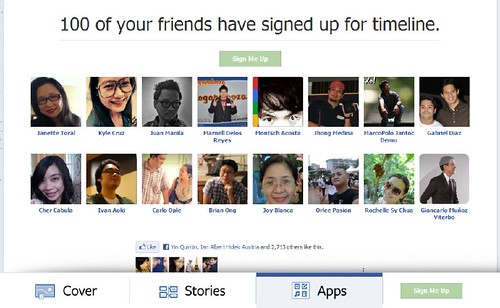
I spotted some of my friends on Facebook that they already upgraded their profiles, here are some of the cover photo that they added in their Facebook profile timeline, you''ll get the idea here on how cute their new upgrades.

more photo screen shot below

Brian Ong_1316812437281

Carlo Ople_1316812425835

Cher Cabula_1316812411417

Joy Blanca_1316812485182

Juan Manila_1316812539600

Kyle Cruz_1316812500037

Janette Toral_1316812338799

Jhong Medina_1316812395974

Montsch Acosta_1316812384323

Ivan Aoki_1316812706445

Orlee Pasion_1316812674645

to sign up with FB timeline and want to know more
just visit https://www.facebook.com/about/timeline

see it ? ganda di ba?
I hope there will be no cover photo contest from brands/companies in the future eheheh.

Live test on the Facebook profile timeline

Azrael Coladilla (1)_1316804944104
Facebook announced earlier on the new updates of their profile UI and I just discovered this after sipping a hot coffee after waking up, I saw the post on Plurk via Joriben and I visited the introduction page of the new Facebook Timeline, I didn't get the idea on the new upgrade after reading and checking out those screen shots, but after I watched the introduction video, I finally get the idea and Facebook is teaching us on how we can tell a story and write our own history via their Facebook Timeline which is soon be use in all Facebook profiles in a few weeks or maybe months. (MORE STORY BELOW)


I jumped to my Facebook wall and then got a time reading some updates on my Facebook news feed and saw some people are trying already the new Facebook profile timeline and they enabled the beta version of the Facebook timeline using some tips posted at TechCrunch. I saw some preview pages of some of my Facebook friends posted as a screen shot photo in their wall, But this new profile timeline is viewable only if you agree and SIGN UP for the Facebook Timeline update, you can activate it by visiting the introduction page at https://www.facebook.com/about/timeline, after some minutes you can now view those new updated Facebook profile timeline of your friends.

I got excited and want to try the new profile timeline, but I'm very scared at first because it might damage the look of my profile page, but I saw that it was a successful test to some people and never heard any complains from them , so I decided to set up my own Facebook profile timeline and followed the instructions posted online. I have two FB friends who posted their tips and using the tips posted by TechCrunch.

Mark Monta
http://www.bugits.com/2011/09/facebook-timeline-how-to-enable-and.html

and Techsterr
http://www.techsterr.com/2011/09/tutorial-how-to-enable-facebook-timeline-feature/

I used Mark Monta's tips in upgrading my FB profile timeline

After doing those instructions to my Facebook, I waited for some minutes for that Timeline activation box in my Facebook main page, after around 15 minutes, I click and enabled the beta version of the Timeline, and it directed me to my profile page now upgraded to the timeline version.

It is easy to set it up.

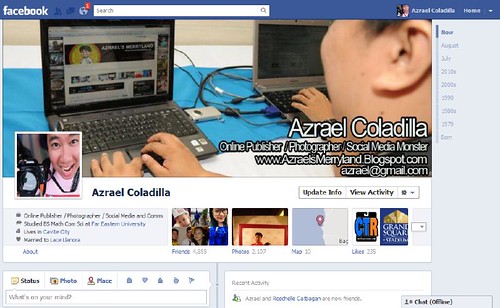
Now I'm having my own FB profile timeline page, it will be used as my ONLINE BUSINESS CARD, hehehe I just got the idea from the old profile photo and this time I'm going to take the advantage of the big COVER PHOTO, that's the thing they call on the photo posted above that can reflect and represent on who you are and what you do. I decided to post a photo with some details about myself and what's the nature of my hobby and work, I also included my email address and when you look at the cover photo, it looks like a business card.

Before you try the timeline you need to understand first on where will be your content be placed on the page.
1. Left side is your recent status updates or post
2. Right side are from your friend's tag or mention
3. Right side sometimes place your old updates or post
4. Below are your old updates and FB activity, they are now listed via month and year
5. Far below are your activity and social apps box, they all show your activity online
6. On the upper right side are your Timeline via Year, choose a year and the page will bring you to the oldest post you have
7. If you click BORN, you have the option if you want to post your baby photo
8. There are some links posted below your COVER PHOTO,they are Friends - a link and thumbnail preview photo of the friends you added, Photos - photo album, Map - if you have used the Facebook Place you'll see the map of our country and the place where you checked in, my recent was in Baguio City, Likes- list of pages you have LIKED, Update Info - a button for profile edit and update, and finally the View Activity - here you can see a notification if someone tags you or mentioned you, its up to you if you want to accept or ignore the tag and add it to your profile

It took me some minutes to understand and I decided to activated it just to familiarize myself in an early stage, because this will be the default look in the next coming weeks or months to Facebook, it will be hard for me to catch up if ever the new profile timeline roll out in all FB users.

This set up will be good for business and company who have their own FB account, they can use their own FB profile account as their website or channel. I'm not sure if this will affect also the FB fan pages, but I know there will be a set up on how they will roll out these new upgrades in all FB fan pages.

Now I'm thinking that after a year, Facebook might replace those websites and blogs.

what do you think ?

I guess I have to subscribe to Facebook Blog just to catch up on some new updates and upgrades from Facebook. https://blog.facebook.com/blog.php?post=10150289612087131
Western Union's 160th anniversary launches an app to discover world's most globally network person

me 2

There’s a way already that you can determine if you are the world’s most globally network individual here in our country or through out the globe. Its just a simple app that can use your Facebook network and add the country stats of the people that added you and generate a nice ranking raging from 470,000 locations in 200 countries. This online app and activity is courtesy of Western Union to mark their 160th anniversary, yes my dear friends, the money delivery service is almost a century and a half old and they still continue giving that secured money transfer service to all nations. (MORE NEWS BELOW)


Here in the Philippines, as being tagged as the social networking capital of the world, will also take part of the network challenge of Western Union via their online app “Western Union: Your World”. We can now see who is the most active and globally connected Pinoy in Facebook and also people in the world with a global rank, world rank or country rank, and who’s that person on the top of all of this ranks? It might be you or your new friend in Facebook.


To join and try the visualization graph of your network stats. All you need to do is:

1. Visit www.westernunionwolrd.com/yourworld

2. Approve and connect the app in your Facebook

3. The app will compute and analyze all your Facebook networks

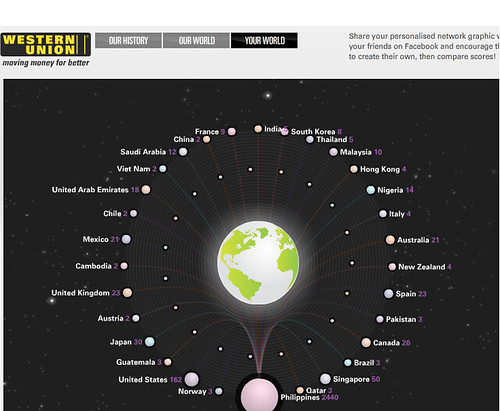
4. Then the app will display your visualization graph, showing each planet as your country and the stats on how many friends you have there in each country

5. Feel free to share the graph in your Facebook wall.


So why Western Union do this ? according to Western Union President and CEO, Hikmet Erserk – “When we were thinking how best to celebrate our landmark 160th anniversary and the role we play in connecting people across the globe, Your World made perfect sense. We’re incredibly proud that people across the globe have been inviting us to be part of their lives for 160 years. Today, we’re online, on mobile, on the phone, around the corner in 470,0001 locations and around the clock. That gives us a privileged and unique perspective on the world. We wanted to find a way to give consumers their own bird’s eye view of their personal network in the world. As well as being a fun way to celebrate the power of human connectivity, Your World is going to create some fascinating insights, and perhaps encourage more of us to reach out to our fellow global citizens.”


Patricia Riingen, Western Union Senior Vice President for Pacific & Indochina said that “Western Union is giving Filipinos the opportunity to make a name for themselves in the global community, Filipinos have come a long way, venturing out into strange lands, building their personal networks and immersing themselves in new cultures whilst maintaining strong ties with their family and friends back home. With the Philippines recently being hailed as ‘the social networking capital of the world’, having nine out of ten online Filipinos on Facebook, it also stands a strong chance of being one of the most geographically connected nations globally”


Here's my stat

Network Rank 11 of 127

Country Rank 92 of 3,276

World Rank 4,675 of 225,979


me fb


https://blogger.googleusercontent.com/img/b/R29vZ2xl/AVvXsEj298iL88kGrZP4BGPrWxrTXsPm7I2b2WEOy0l6-b4yAlD85b1MWFpXp6uIPNSIr9H1m0FX8Q4rHn6Vrrz6QwIHAcQSfeJsGUlh-CF3hxCmkUFZnUw1G8spsooTOYSoiMSGFkCZjYj2_LOU/s1600/western+union+homepage.jpg

Are you the world’s most globally networked individual?

http://www.westernunionworld.com/yourworld/

Suplado ako ngayon sa mga Facebook LIKES request via FB chat


(annoyed)
sa mga favor favor..alam ko na yung favor na yan LOL

If you are going to campaign your entry of a contest via FB Like, it will be better not to bug people who are online on FB chat, you are just wasting your time and people in your network will be annoyed by random LIKES request.

here's a tip on how to campaign your FB LIKES
1. Post a message in your FB WALL
2. tag your friends that you know personally (and knows you)
3. send a private message to your friends and family (those who are close to you)
4. avoid FB chat posting of LIKES request to any people who are online
5. Create your own FB Page or fan page and you can campaign all of your requests there
6. Go to the brand's FB Page and start doing your own campaign there
7. Do not post your request campaign in your friend's FB WALL

I hope this tip will be helpful to others, especially to some private entities that are annoying already who are heavily spamming via FB chat people in their network - to add them...to like them.. without any proper introduction or formal message.

istorbo kasi minsan e. I like to close my FB chat, but I need to open it to have chat communications with my family and friends .

If you are my friend and we know each other personally. You have my support for FB likes, just send a request in a good way.. send a PM or note me

Come Monday...The Despicable Social Network

“Come Monday…” is a weekly series that will involve a review of, or commentary about,  websites, movies, documentaries, television shows, sports, music, and whatever else may tickle my fancy at the time.  Be assured that these reviews will be generally positive, as in accordance to the Jimmy Buffett song “Come Monday.”  This is subject to change, however.  In fact, I would be most derelict in my duties to neglect going on a rant every once in a while.  For rants promote change, and change can be good—right?  Therefore, since good is generally considered as being a positive force in 99.3% of the parallel universes that I am aware of, even a rant could be considered as being something positive, and a genuine hissy-fit would be even better (so I’m told).


Last Saturday, I inched a little closer to getting caught-up with all that is happening by watching a couple of movies that came out last year (or maybe a year or two before). The first one was [The Social Network], which is about Facebook, which made me ashamed for having anything to do with it.

No, it is not so much that Facebook is so despicable. Although, there is much about it that I certainly despise. For the movie focused upon the founder, [Mark Zuckerberg], who makes [Dr. Sheldon Cooper] seem far less intolerable.

Okay, maybe that was a little harsh. For the Mark Zuckerberg in the movie makes Dr. Sheldon Cooper seem quite lovable.

Yeah, yeah, yeah, there has to be something seriously wrong with the boy, and I should know better than most that it is probably not his fault. For from what is depicted in The Social Network, which is supposed to be treating him more than fairly, he really doesn’t understand that it is wrong to screw your friends and steal ideas from others.

Perhaps not to anyone else, but I found it rather interesting that [Justin Timberlake], who is at the top on the left, looks more Mark Zuckerberg, who is in the middle, than [Jesse Eisenberg], who did play him in the movie and is at the bottom on the left.  Could it be that Timberlake didn't want his name associated with such a despicable character?

No, that can’t be it. For Timberlake played [Sean Parker], who is credited with being the founder of [Napster] in the movie, and the way Timberlake played him left little doubt that he fully understood every despicable move he was making.

Yeah, I am quite sure that a great amount of artistic license was being applied in The Social Network. On the other hand, I am also quite sure that quite a few on Wall Street were applauding the sheer audacity of Zuckerberg and Parker in the movie. For when it comes to business in a capitalist society, if you can’t keep your rear covered, you are asking for “it.”


Nope, there is nothing like flipping the script, and the second movie I watched last Saturday did just that. For [Despicable Me] had me feeling as good as The Social Network had me feeling bad.

If you haven’t seen it, [here] is a listing of the times it will be on HBO. Of course, if you have HBO, you probably have access to their [On Demand] service, and if have that, you can watch it anytime you like for as long it is available.

Hey, if you don’t mind spending a little dough, Despicable Me really would be available for viewing anytime you liked if you bought a copy. No, Amazon, nor anyone else, is paying me anything, but (LIGHTBULB!) (it’s in the movie) that is something for me to see about…


Please Also Visit:
and

Followers

Pageviews